- Published on
单元测试
- Authors

- Name
- MissTree
当前主要了解 Jest 和 Vitest 框架
Jest
Jest 是 Facebook 开源的一个测试框架,它提供了一套非常简单易用的 API,可以用来测试 JavaScript 代码。Jest 的特点包括:
- 自动发现测试文件:Jest 可以自动发现测试文件,无需手动指定测试文件。
- 快速执行测试:Jest 使用并行执行测试,可以快速执行测试。
- 丰富的断言库:Jest 提供了一套丰富的断言库,可以方便地编写测试用例。
- 支持异步测试:Jest 支持异步测试,可以方便地测试异步代码。
- 支持快照测试:Jest 支持快照测试,可以方便地测试组件的渲染结果。
安装与配置
npm install --save-dev jest

// package.json
{
  "scripts": {
    "test": "jest"
  }
}
测试的文件名中必须包含 "test." 或 "spec." 。 Jest 默认会查找以下类型的测试文件:在 tests 文件夹中的 .js 文件,将要测试的文件复制一份到 tests 文件夹,然后再测试文件直接引用
常用API
describe:用于描述测试套件。test:用于描述测试用例。it:用于描述测试用例。expect:用于断言。
配置文件
// jest.config.js
export default {
  verbose: true,
  roots: ['<rootDir>/src'],
  testMatch: [
    '/__tests__/**/*.[jt]s?(x)',
    '**/?(*.)+(spec|test).[jt]s?(x)'
  ],
  testEnvironment: 'jsdom',
  moduleFileExtensions: ['ts', 'tsx', 'js', 'jsx', 'json', 'node'],
  // 转译设置 ,需要安装包依赖
  transform: {
    '^.+\\.(js|jsx)$': 'babel-jest',
    '^.+\\.(ts|tsx)$': 'ts-jest',
  },
  // extensionsToTreatAsEsm: [ '.mjs'],
  testPathIgnorePatterns: [
    '/node_modules/',
    '/dist/',
    '/build/',
    '/.next/'
  ],
  // 处理 TypeScript (如果需要)
  preset: 'ts-jest/presets/default-esm',
  globals: {
    'ts-jest': {
      useESM: true,
      tsconfig: 'tsconfig.esm.json'
    }
  }
  // 覆盖率
  collectCoverage: true,
  coverageDirectory: '__tests__/coverage',
  // 别名映射
  moduleNameMapper: {
    '^@/(.*)$': '<rootDir>/src/$1',
    '^pages/(.*)$': '<rootDir>/src/pages/$1',
    '^router/(.*)$': '<rootDir>/src/router/$1',
    '^widget/(.*)$': '<rootDir>/src/widget/$1',
    '^utils/(.*)$': '<rootDir>/src/utils/$1',
    '^~assets/(.*)$': '<rootDir>/src/assets/$1',
    '^config/(.*)$': '<rootDir>/src/config/$1',
    '^store/(.*)$': '<rootDir>/src/store/$1',
  }
};
常用断言
toBe:用于比较两个值是否相等。toEqual:用于比较两个对象是否相等。toBeNull:用于判断一个值是否为 null。
常用匹配器
常用钩子函数
// Applies to all tests in this file
beforeEach(() => {
  return initializeCityDatabase();
});

test('city database has Vienna', () => {
  expect(isCity('Vienna')).toBeTruthy();
});

test('city database has San Juan', () => {
  expect(isCity('San Juan')).toBeTruthy();
});

describe('matching cities to foods', () => {
  // Applies only to tests in this describe block
  beforeEach(() => {
    return initializeFoodDatabase();
  });

  test('Vienna <3 veal', () => {
    expect(isValidCityFoodPair('Vienna', 'Wiener Schnitzel')).toBe(true);
  });

  test('San Juan <3 plantains', () => {
    expect(isValidCityFoodPair('San Juan', 'Mofongo')).toBe(true);
  });
});

// 执行周期
describe('describe outer', () => {
  console.log('describe outer-a');

  describe('describe inner 1', () => {
    console.log('describe inner 1');

    test('test 1', () => console.log('test 1'));
  });

  console.log('describe outer-b');

  test('test 2', () => console.log('test 2'));

  describe('describe inner 2', () => {
    console.log('describe inner 2');

    test('test 3', () => console.log('test 3'));
  });

  console.log('describe outer-c');
});

// describe outer-a
// describe inner 1
// describe outer-b
// describe inner 2
// describe outer-c
// test 1
// test 2
// test 3
常用快照测试
import renderer from 'react-test-renderer';
import Link from '../Link';

it('renders correctly', () => {
  const tree = renderer
    .create(<Link page="http://www.facebook.com">Facebook</Link>)
    .toJSON();
  expect(tree).toMatchSnapshot();
});
Mock 模拟
- 手动 Mock
// __mocks__/userApi.js
export const getUser = jest.fn(() => Promise.resolve({
  id: 1,
  name: 'Mock User'
}));

import { getUser } from '../api/userApi';
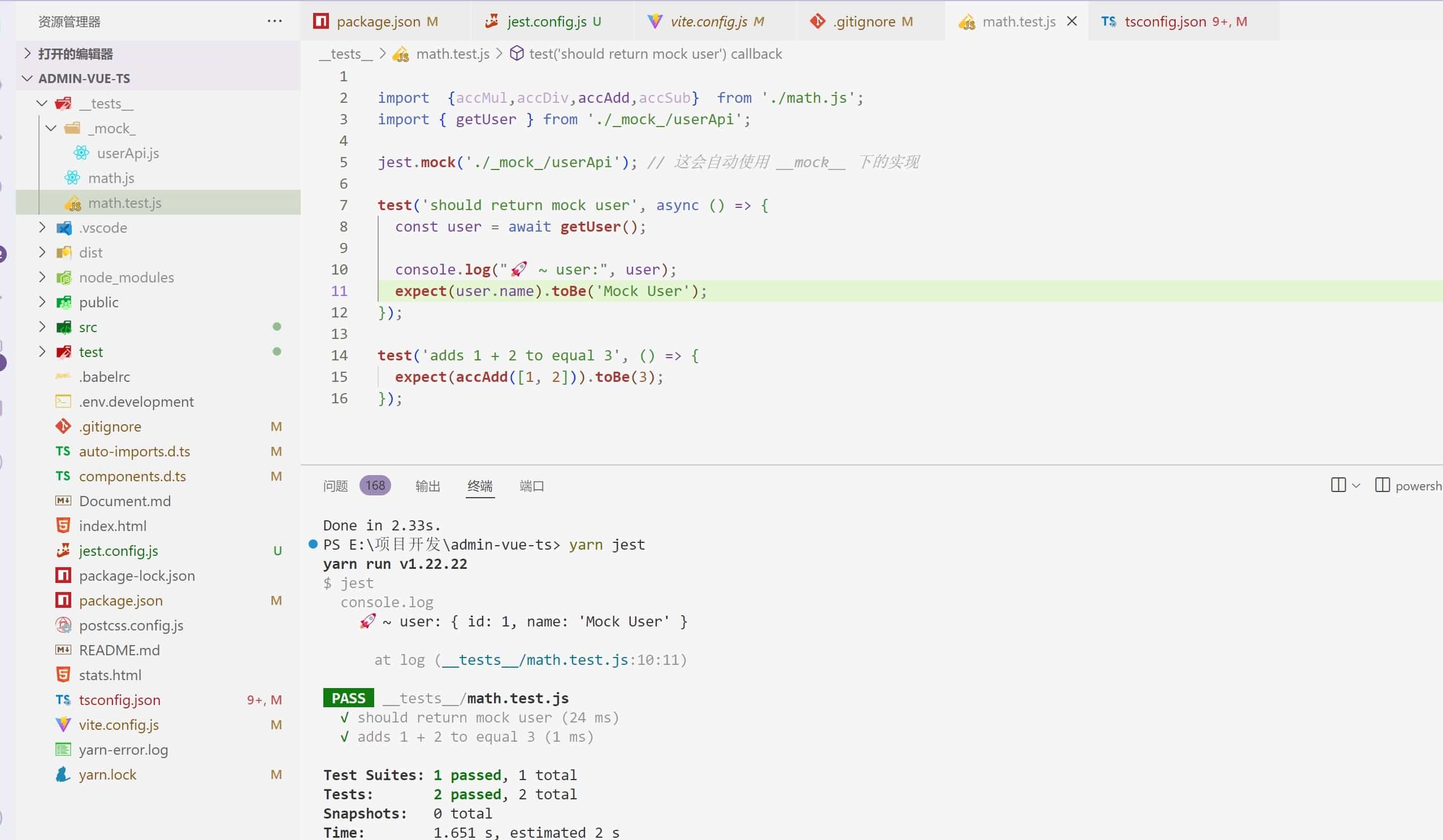
jest.mock('../api/userApi'); // 这会自动使用 __mocks__ 下的实现

test('should return mock user', async () => {
  const user = await getUser();
  expect(user.name).toBe('Mock User');
});
- 内联 Mock
const mockFn = jest.fn();
mockFn.mockReturnValue(42);

test('mock function', () => {
  expect(mockFn()).toBe(42);
});


jest.mock('axios', () => ({
  get: jest.fn(() => Promise.resolve({ data: 'mock data' }))
}));

import axios from 'axios';

test('mock axios', async () => {
  const response = await axios.get('/api');
  expect(response.data).toBe('mock data');
});
- Mock 实现控制
const mockFn = jest.fn();

// 设置返回值
mockFn.mockReturnValue('default')
     .mockReturnValueOnce('first call')
     .mockReturnValueOnce('second call');

// 设置实现
mockFn.mockImplementation(() => 'complex implementation');

// 设置 Promise 返回值
mockFn.mockResolvedValue('async value');
- Mock 部分实现
jest.mock('../module', () => {
  const originalModule = jest.requireActual('../module');

  return {
    ...originalModule,
    functionToMock: jest.fn()
  };
});
- Mock 模块
// api.js
export const fetchData = async () => {
  const response = await fetch('/api/data');
  return response.json();
};

// api.test.js
import { fetchData } from './api';

beforeAll(() => {
  global.fetch = jest.fn(() =>
    Promise.resolve({
      json: () => Promise.resolve({ data: 'mock data' })
    })
  );
});

afterAll(() => {
  global.fetch.mockRestore();
});

test('fetchData returns mock data', async () => {
  const data = await fetchData();
  expect(data).toEqual({ data: 'mock data' });
  expect(global.fetch).toHaveBeenCalledWith('/api/data');
});
测试用例
test('the data is peanut butter', async () => {
  const data = await fetchData();
  expect(data).toBe('peanut butter');
});

test('the fetch fails with an error', async () => {
  expect.assertions(1);
  try {
    await fetchData();
  } catch (error) {
    expect(error).toMatch('error');
  }
});

// 描述测试套件
describe('模块/组件名称', () => {
  // 测试前的准备工作
  beforeAll(() => {
    // 在所有测试之前执行一次
  });

  beforeEach(() => {
    // 在每个测试之前执行
  });

  // 单个测试用例
  test('应该...', () => {
    // 测试断言
    expect(...).toBe(...);
  });

  // 也可以用 it() 别名
  it('应该...', () => {
    // 测试断言
  });

  // 测试后的清理工作
  afterEach(() => {
    // 在每个测试之后执行
  });

  afterAll(() => {
    // 在所有测试之后执行一次
  });
});
react 组件使用
import React from 'react';
import { render, screen } from '@testing-library/react';
import Button from './Button';

describe('Button 组件', () => {
  test('渲染正确的内容', () => {
    render(<Button>点击我</Button>);
    expect(screen.getByText('点击我')).toBeInTheDocument();
  });

  test('点击事件触发', () => {
    const handleClick = jest.fn();
    render(<Button onClick={handleClick}>点击</Button>);

    fireEvent.click(screen.getByText('点击'));
    expect(handleClick).toHaveBeenCalledTimes(1);
  });
});
Vitest
Vitest 是一个基于 Vite 的测试框架,它提供了一套简单易用的 API,可以用来测试 JavaScript 代码。Vitest 的特点包括:
- 基于 Vite:Vitest 基于 Vite,可以充分利用 Vite 的性能优势。
- 支持异步测试:Vitest 支持异步测试,可以方便地测试异步代码。
- 支持快照测试:Vitest 支持快照测试,可以方便地测试组件的渲染结果。
安装与配置
npm install --save-dev vitest

// vite.config.js  若是使用了 vite ,用 /// <reference types="vitest" /> 引入vitest
// 若是没有使用 vite ,则直接在 package.json 中配置即可,或者新增 vitest.config.js 文件
/// <reference types="vitest" />
import { defineConfig } from 'vite'
import vue from '@vitejs/plugin-vue'

export default defineConfig({
  plugins: [vue()],
  test: {
    globals: true,// 启用全局API
    // jsdom-浏览器环境模拟 安装 jsdom 包 ,happy-dom-被认为比 jsdom 更快 安装 happy-dom 包
    // edge-runtime 模拟 Vercel 的 edge-runtime,使用 @edge-runtime/vm 包
    // 默认 node
    environment: 'happy-dom',
    transformMode: {
      web: [/\.vue$/],
    },
    // 可选:指定测试文件的路径
    include:['test/**/*.test.js','test/**/*.spec.ts'],
    // 可选:指定测试文件的初始化文件
    exclude:['node_modules','dist','**/*.css',"src/**/*.vue","src/**/*.js","src/**/*.ts"],
    css: {
      modules: {
        classNameStrategy: 'non-scoped',
      },
    },
    // 可选:强制内联某些依赖 比如排除element-plus 不内联,避免出现 Unknown file extension “.css”
    deps: {
      inline: ['element-plus'],
    }
  },
})

// package.json
{
  "scripts": {
    "test": "vitest"
    // 或者
    "test": "vitest --config=vitest.config.js"
  }
}
常用API
配置文件
environment:指定测试环境。transformMode:指定文件类型的转换模式。setupFiles:指定测试文件的初始化文件。setupFilesAfterEnv:指定测试文件的初始化文件。globalSetup:指定全局的初始化文件。globalTeardown:指定全局的清理文件。testTimeout:指定测试的超时时间。coverage:指定覆盖率报告的配置。- reporter:['text', 'json', 'html', 'lcov'],报告格式(支持多种)
- provider:'istanbul'||'v8',指定覆盖率报告的提供者,需要下载指定的依赖。
- reportsDirectory:'test/coverage',指定测试报告的配置。
globals: true 全局使用vitest的 API,不需要引入,但是在ts文件需要额外配置
确保安装了 Vitest 的类型定义:
npm install --save-dev @types/node @vitest/globals

// 在 compilerOptions.types 中添加 vitest/globals:
// tsconfig.json
{
  "compilerOptions": {
    "types": ["vitest/globals"]
  },
  "include": ["src", "test"],
  "exclude": ["node_modules"]
}
测试文件
test:定义一个测试用例,别名: it。- test.each:定义多个测试用例。
- test.only:只执行当前测试用例。
- test.skip:跳过当前测试用例。
- test.skipIf:
test.skipIf(condition)( 'skipped test',fn),在条件下跳过当前测试用例。 - test.todo:
test.todo('unimplemented test'),来存根测试,以便稍后实施,以便知道还有多少测试需要执行。
bench:基准是定义一系列操作的函数。Vitest 会多次运行该函数,以显示不同的性能结果。- bench.skip
- bench.only
- bench.todo
it:定义一个测试用例。describe:定义一个测试套件,用来包裹 test、bench、it方法,。expect:断言测试结果。- expect(value).toBe(value):断言值是value。
- expect(value).toEqual(value):断言值是否相等。
- expect(value).toBeTruthy():断言值是否为真。
- expect(value).toBeFalsy():断言值是否为假。
- expect(fn).toBeDefined():断言fn值是否有返回值。
- expect(value).toBeUndefined():断言值是否没有返回值。
- expect(value).toBeNull():断言值是否为 null。
- expect(value).toBeNaN():断言值是否为 NaN。
- expect(value).toBeGreaterThan(value):断言值是否大于指定值。
- expect(value).toBeLessThan(value):断言值是否小于指定值。
- expect(value).toBeGreaterThanOrEqual(value):断言值是否大于等于指定值。
- expect(value).toBeLessThanOrEqual(value):断言值是否小于等于指定值。
- expect(value).toContain(value):断言值是否包含指定值,或者说是否在Dom元素内。
- expect(value).toMatch(regexp):断言值是否匹配指定的正则表达式。
assert:断言测试结果,用法和 expect 差不多。
生命钩子
beforeEach:在每个测试用例之前执行。afterEach:在每个测试用例之后执行。beforeAll:在所有测试用例之前执行。afterAll:在所有测试用例之后执行。onTestFailure:在测试用例失败时执行。onTestFinished:在测试用例完成时执行。
import { describe, it, expect, beforeEach, afterEach } from 'vitest'

describe('MyComponent', () => {
  let wrapper

  beforeEach(() => {
    wrapper = mount(MyComponent)
  })

  afterEach(() => {
    wrapper.unmount()
  })

  it('renders correctly', () => {
    expect(wrapper.text()).toContain('Hello World')
  })
})
一般情况下,执行测试的文件名中必须包含 "*test." 或 "*spec." 。
Mock
| 方法名 | 描述 |
|---|---|
| vi.fn() | Mock 函数 |
| vi.mock() | Mock 模块 |
| vi.fn() + vi.mock() | Mock 类 |
| mockResolvedValue() | Mock 异步 |
| vi.stubGlobal() | Mock 全局对象 |
| importOriginal() | 部分 Mock |
| vi.clearAllMocks() | 重置 Mock |
// 1. vi.fn() 函数:
import { vi } from 'vitest';

const mockFn = vi.fn((a, b) => a + b);

test('mock function', () => {
  expect(mockFn(1, 2)).toBe(3); // 调用 mockFn
  expect(mockFn).toHaveBeenCalled(); // 检查是否被调用
  expect(mockFn).toHaveBeenCalledWith(1, 2); // 检查调用参数
});

// 模拟返回值
const mockFn = vi.fn()
  .mockReturnValue(42) // 默认返回值
  .mockReturnValueOnce(10); // 第一次调用返回 10

test('mock return values', () => {
  expect(mockFn()).toBe(10); // 第一次返回 10
  expect(mockFn()).toBe(42); // 之后返回 42
});

// 2.Mock 模块
// fetchData.ts
export const fetchData = async () => {
  const res = await fetch('/api/data');
  return res.json();
};

import { fetchData } from './fetchData';
import { vi } from 'vitest';

// 模拟整个模块
vi.mock('./fetchData', () => ({
  fetchData: vi.fn().mockResolvedValue({ data: 'mocked data' }),
}));

test('fetchData returns mocked data', async () => {
  const data = await fetchData();
  expect(data).toEqual({ data: 'mocked data' });
});


import { fetchData, originalFunction } from './fetchData';

vi.mock('./fetchData', async (importOriginal) => {
  const mod = await importOriginal(); // 获取原始模块
  return {
    ...mod, // 保留其他函数
    fetchData: vi.fn().mockResolvedValue('mocked data'), // 只模拟 fetchData
  };
});

test('partial mock', async () => {
  expect(await fetchData()).toBe('mocked data'); // 模拟的
  expect(originalFunction()).toBe('real implementation'); // 原始的
});


// 3. Mock 类
// UserService.ts
export class UserService {
  getUser(id: number) {
    return fetch(`/api/users/${id}`).then(res => res.json());
  }
}

import { UserService } from './UserService';
import { vi } from 'vitest';

const mockGetUser = vi.fn().mockResolvedValue({ id: 1, name: 'Mocked User' });

vi.mock('./UserService', () => ({
  UserService: vi.fn(() => ({
    getUser: mockGetUser,
  })),
}));

test('mock class method', async () => {
  const userService = new UserService();
  const user = await userService.getUser(1);
  expect(user).toEqual({ id: 1, name: 'Mocked User' });
  expect(mockGetUser).toHaveBeenCalledWith(1);
});


// 4. Mock 第三方库
import axios from 'axios';
import { vi } from 'vitest';

vi.mock('axios');

test('mock axios', async () => {
  const mockedAxios = axios as jest.Mocked<typeof axios>;
  mockedAxios.get.mockResolvedValue({ data: { id: 1 } });

  const res = await axios.get('/api/user');
  expect(res.data).toEqual({ id: 1 });
});


// 5. Mock 全局对象
import { vi } from 'vitest';

const mockLocation = {
  href: 'https://example.com',
  reload: vi.fn(),
};
vi.stubGlobal('location', mockLocation);

test('mock window.location', () => {
  location.reload();
  expect(location.href).toBe('https://example.com');
  expect(location.reload).toHaveBeenCalled();
});


// 6. 重置 Mock
afterEach(() => {
  vi.clearAllMocks(); // 清除调用记录
  vi.restoreAllMocks(); // 恢复原始实现
});
编写测试用例
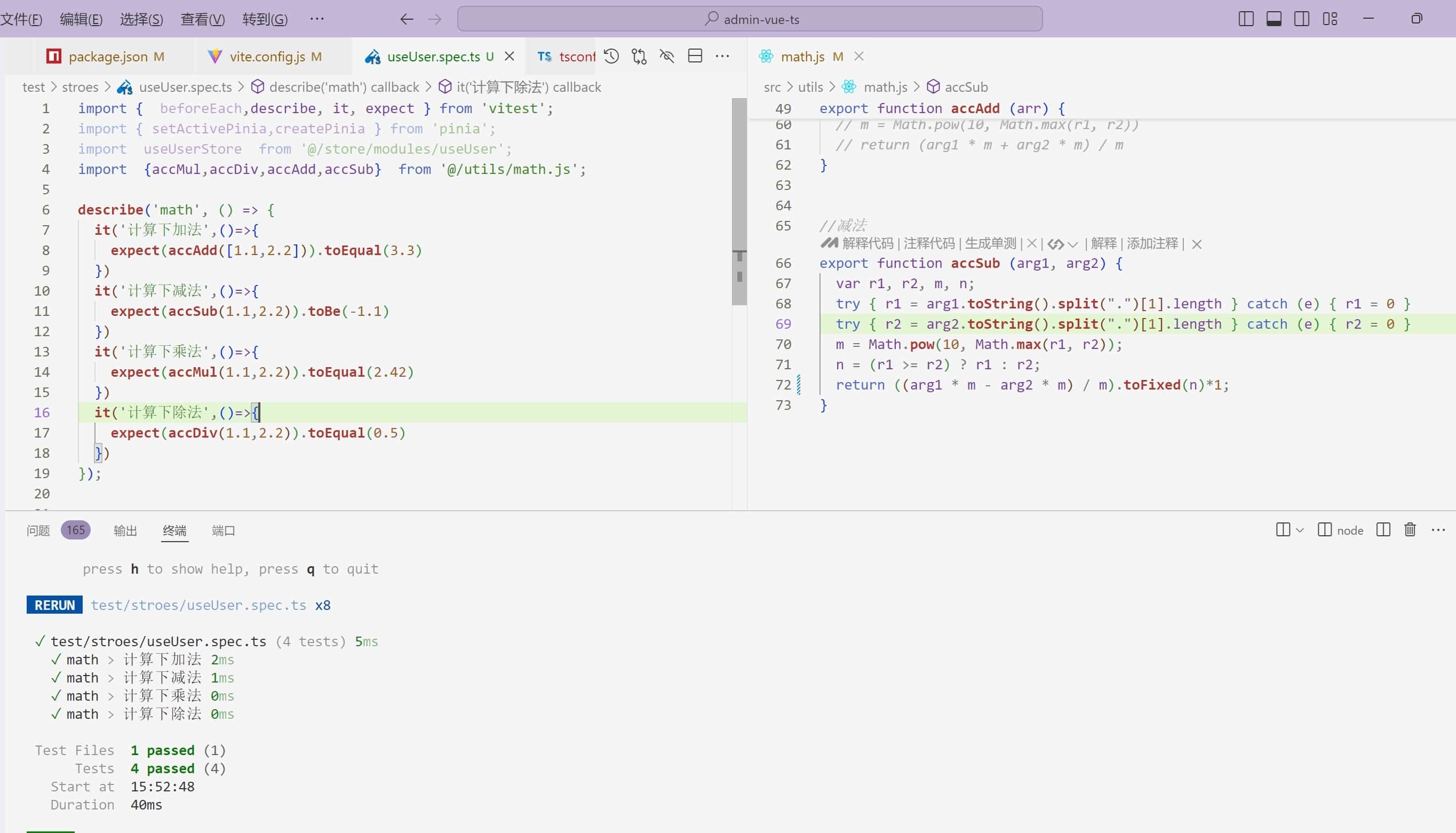
import { mount } from '@vue/test-utils'
import MyComponent from '@/components/MyComponent.vue'

describe('MyComponent', () => {
  it('renders correctly', () => {
    const wrapper = mount(MyComponent)
    // 断言测试结果
    expect(wrapper.text()).toContain('Hello World')
  })
}
支持源码内联测试
// the implementation
export function add(...args: number[]) {
  return args.reduce((a, b) => a + b, 0)
}

// 源码内的测试套件
if (import.meta.vitest) {
  const { it, expect } = import.meta.vitest
  it('add', () => {
    expect(add()).toBe(0)
    expect(add(1)).toBe(1)
    expect(add(1, 2, 3)).toBe(6)
  })
}

// 更新 Vitest 配置文件内的 includeSource 以获取到 src/ 下的文件: [文档](https://cn.vitest.dev/guide/in-source.html)
import { defineConfig } from 'vitest/config'

export default defineConfig({
  test: {
    includeSource: ['src/**/*.{js,ts}'],
  },
})
创建快照
import { mount } from '@vue/test-utils'
import MyComponent from '@/components/MyComponent.vue'

describe('MyComponent', () => {
  it('renders correctly', () => {
    const wrapper = mount(MyComponent)
    // 断言测试结果
    expect(wrapper.html()).toMatchSnapshot()
  })
})

// 运行文件后会在当前测试文件的同级目录下生成 __snapshots__ 目录,里面存放着快照文件,快照文件的名称为测试用例的名称加上 .snap 后缀。
// 可以通过在命令行中运行 vitest --updateSnapshot 来更新快照文件。
测试覆盖率
// 运行文件后会在当前测试文件的同级目录下生成 __coverage__ 目录,里面存放着覆盖率报告。
// 可以通过在命令行中运行 vitest --coverage 来生成覆盖率报告。